A new Daily Special color and tips to earn more Bits
Spill the tea: how to get more Bits donations with the Pando Twitch extension
To celebrate a new Daily Special color, Earl Grey, we are sharing a few tips to get more Bits with the Pando Twitch extension.

A new Daily Special: Earl Grey
The next Daily Special color to unlock is Earl Grey, a soft, grey-noir look inspired by the classic tea. Like every Daily Special, it unlocks after viewers spend 1000 Bits through the extension.
Earl Grey can now be activated for a selection of pets.
"I've never received Bits, and what even is a Daily Special?"
Receiving Bits is a mark of appreciation from your viewers. Twitch extensions enhance the experience, and Pando does that with the stream pet on your channel. The interactions are triggered in the Pet Café.
Viewers can give your pet a treat, and in return the creator receives 80% of the Bits, and the developers receive 20%*. From the donation, your pet gets experience to level up and obtain new colors.
*Standard Twitch cut. If you want to keep 100%, read more here:
Bits can also be used to unlock colors. During Halloween and Christmas, it's called a holiday special, and if you want that experience all year round, you can activate the Daily Special: it's a great way to earn more Bits. Here's how you can increase your chances of a donation.
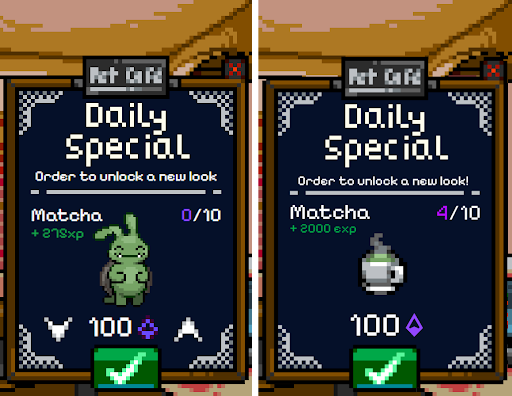
The Daily Special is displayed immediately, in an Informative or Immersive experience.
Tips to increase your Bits donations
Here are a few things you can check to earn more Bits with Pando:
- Component extensions have more visibility. Attach the Pet Café as a component, and your viewers will immediately discover the extension when you go live.
- Talking about it and sharing your interest are powerful ways to get donations. Almost everyone has visited a café. Ask your viewers about their favorite drink, their go-to cake, etc., and browse through the colors on the configuration page to match them.
- Mention your progress on the Daily Special and how close you are to the goal.
- Celebrate donations by highlighting the support you receive, and clip the moment your new color unlocks for anyone who wasn't there.
- If you have Pando VIP, you can make a chat command or idle message that occasionally mentions the Daily Special for you. Your pet will generate a funny response, based on the personality, and you don't forget to mention it.
Improvements and minor bug fixes for the Daily Special
Alongside the new features, we squashed a few smaller issues:
- It's now easier to select a new Daily Special color
- We've added an icon to show which color is currently on display
- General stability improvements across the Pet Café and Space Café extensions
In general, the Daily Special automatically rotates to a new color after a short cooldown, so you don't need to keep a constant eye on it. Check what's on your display by going here.
Questions and answers
Does Earl Grey replace an existing color?
No, it's an addition. Earl Grey joins the rotation alongside the other Daily Special colors.
Do I need to reconfigure anything to see the new display controls?
No, the updated management panel is available automatically the next time you open the extension settings.
Will more colors be added the same way going forward?
Yes, expect new Daily Special colors to keep rolling out periodically, each tied to a drink or treat theme. Tell us your favorite drink by suggesting it in our Discord.
Coming soon?
Let us know how you've succeeded in getting more Bits, and where we think we can refine the Daily Special experience. Here's what's on our mind right now:
- Display visual progress in the browser source (above/underneath the pet)
- Automatically clip the moment you unlock a Daily Special color (no spoilers, but it's a cool moment)
Stay tuned for more colors and more control coming to the café soon! Talk with us in the Discord.